Website quality
Set up your first Journey Monitor
Choose a customer task, review its steps and test it before starting regular checks.
Reviewed
Choose a task worth checking
Start with one action a visitor needs to complete: adding a product to a basket, opening a contact form or reaching checkout. Open Journey monitoring and choose Create a journey.
A suggestion from a scan is not an active monitor. Check its starting page and purpose before choosing Set up with Pulse.
Build and review the steps
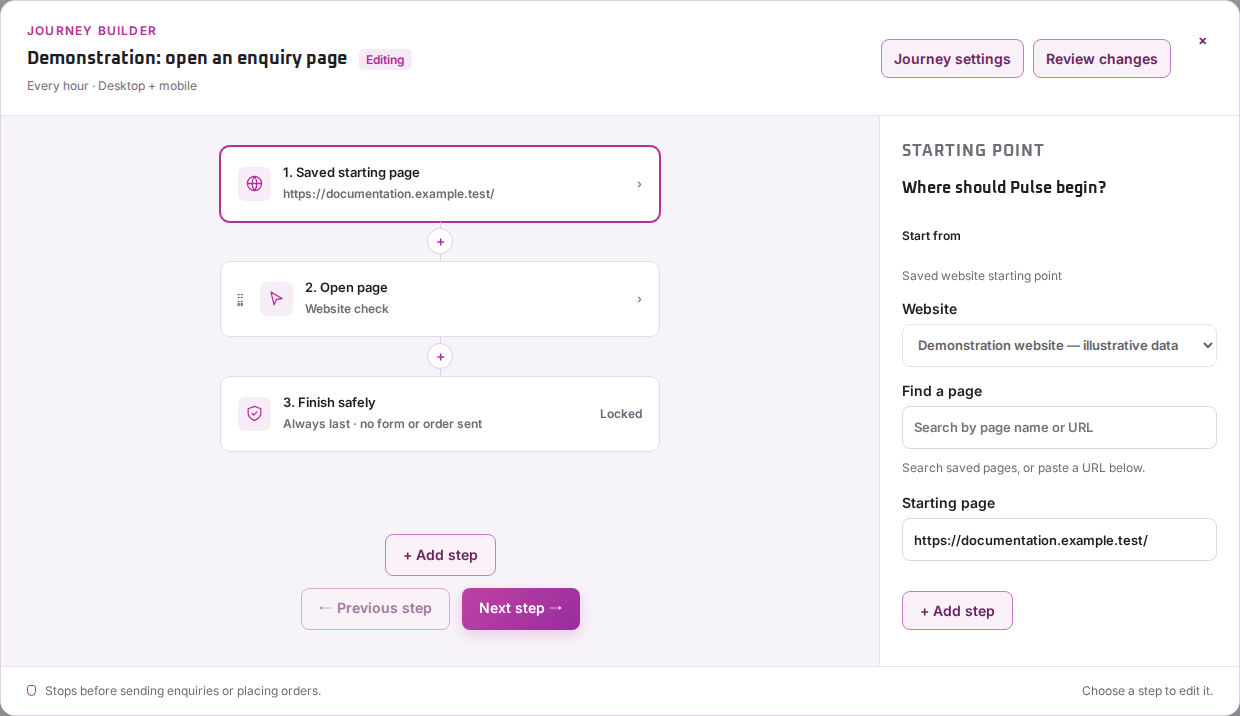
- Describe the task to Pulse, or choose Set up manually.
- Select the website and starting page. Give the journey a name you’ll recognise.
- Review the actions in order, the devices to check and the frequency.
- Keep the final safe stopping step, then choose Review journey.
- Read the proposed sequence and follow the test flow.
Journeys stop before sending a form or placing an order. Reaching a checkout or form page does not confirm payment or message delivery.
Start regular checks
Read the test result before confirming it. Check the steps and screenshots for each device and cookie choice. After a successful test, your confirmation starts regular checks.
If the test stops at the wrong page or action, edit the journey and test again. A saved draft, failed test or paused journey is not active monitoring.
For help choosing actions, see journey steps and devices. For the next test, follow Run & watch.