Journey Monitoring
Choose journey steps, pages and devices
Build a short sequence that checks the intended customer task on the right layout.
Reviewed
Open the journey editor
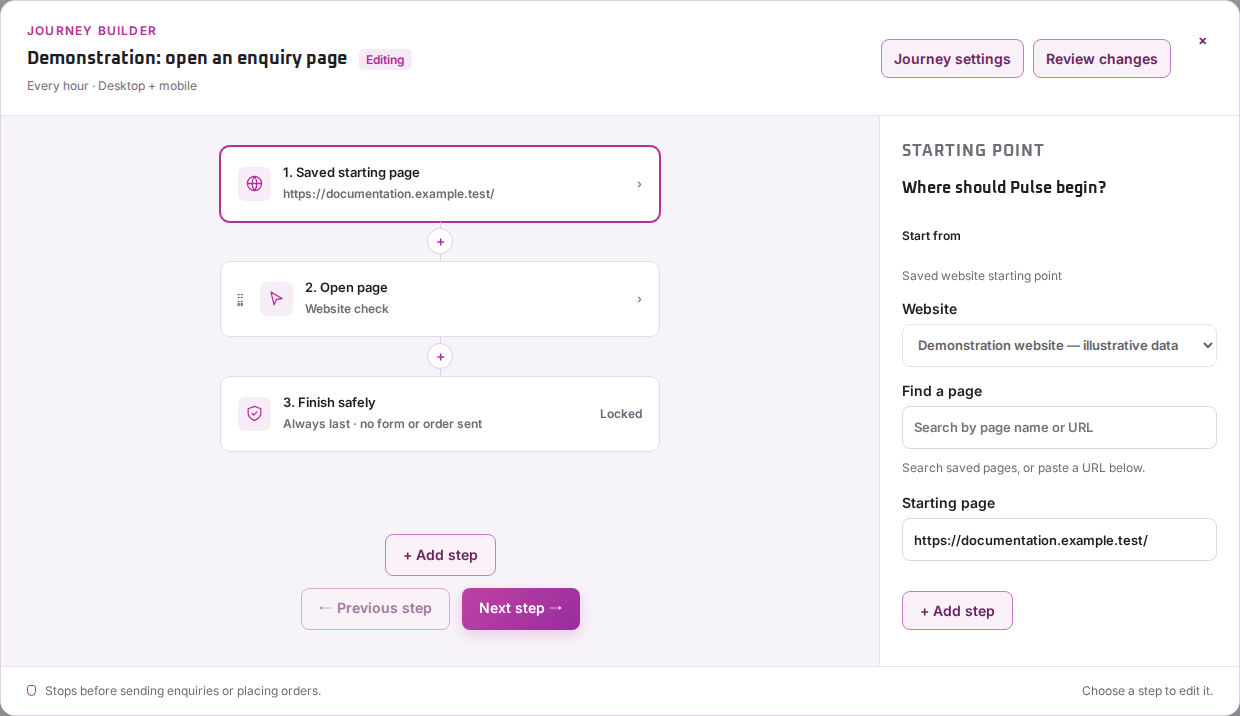
From Journey monitoring, choose Set up manually for a new journey. For a saved journey, open Manage → Edit. Check Website, Starting page, Journey name and What should Regal Pulse check?.
The description explains the goal. The ordered journey steps determine the checks the browser runs.
Review each step
- Start with the check that the page loads.
- Use Find actions on this page to inspect available actions when that discovery is supported.
- Add the relevant check or action. Choose the item on the page and any expected text or option the editor requests.
- Use Move up, Move down and Remove to keep the sequence in the right order.
- Keep Finish safely before sending or purchasing at the end.
If an item cannot be identified safely, review the page and choose a clearer target rather than guessing which page element to select.
Choose devices and check the result
Runs on offers desktop, mobile or both. A mobile menu can require a different sequence from the desktop layout, so inspect each result you enable.
Choose Review journey and test the complete sequence. Successful page loading alone does not establish that the later steps work. Check the timeline and final safe stopping point before accepting the reference.