Scans and reports
Read findings and decide what to fix first
Separate recorded evidence from interpretation and keep follow-up organised.
Reviewed
Start with the scan and category
Open the report for the website and date you want to investigate. Review the category score, then the individual findings. Severity helps you choose where to start; confidence and evidence help you judge what the finding establishes.
A high score is not a guarantee that every visitor can use the site. Some checks are automated and some parts of a restricted site may not have been observed.
Read the evidence before acting
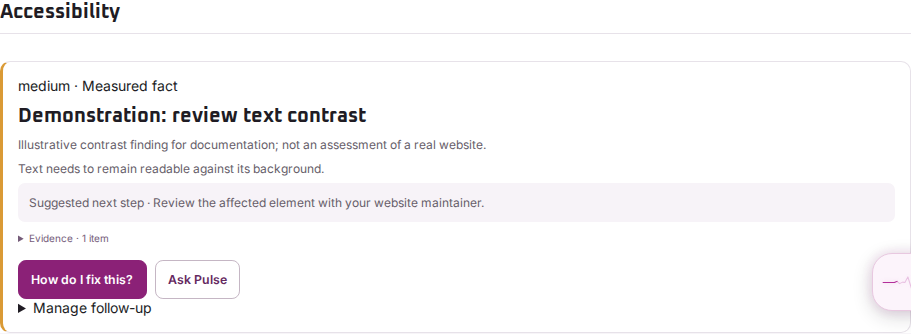
- Read the title, severity and explanation.
- Open Evidence and check the affected page and recorded detail.
- Notice whether the item is a Measured fact or an Interpretation.
- Use the recommendation, How do I fix this? or Ask Pulse, where available, to plan the next investigation.
For example, a contrast warning identifies a colour relationship to review. It does not show that every accessibility requirement was tested.
Organise follow-up without hiding the result
Acknowledge a finding when someone is reviewing it. Ignore or snooze only when the stated reason and reminder timing suit your situation. These controls manage follow-up; they do not repair the website or recalculate the saved score.
After a website change, compare a later scan with the earlier evidence. If a finding looks wrong, send support the report link and the affected page rather than describing only the overall score.