Availability and DNS
Monitor DNS records and review a change
Check which records changed and whether the change was planned.
Reviewed
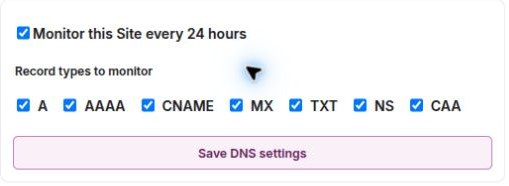
Choose the records to monitor
Open Monitors, find DNS Monitoring and expand its details. Review Record types to monitor, the enabled state and the last check. The supported types are A, AAAA, CNAME, MX, NS, TXT and CAA.
DNS monitoring observes published domain records; it does not edit your DNS provider. After changing the monitored types, allow a new baseline to be established before expecting change comparisons.
Review a recorded change
- Check the detection date, record type, previous value and current value.
- Compare them with an intended change at your domain or hosting provider.
- Check the service the record affects: for example, MX records relate to mail routing.
- If it was planned, use the option to mark the change as expected.
Marking a change expected records your review. It does not change DNS or prove that the related service works.
If checks are paused, delayed or unsuccessful
Check the enabled state, selected website, last successful check and next check. A new baseline, a resolution failure and a confirmed record change are different states.
Allow for DNS caching and propagation when comparing providers, then investigate the specific record rather than repeatedly changing settings. If the result remains unclear, contact support with the domain, record type, time and displayed error. Do not send private verification values unless support arranges an appropriate channel.
Choose the DNS record types